📅 New Feature: Flexible Availability Declaration Methods
What's New
Officials now have two methods for declaring their availability in Ref Insight, giving them the flexibility to choose the approach that works best for their schedule.
The Two Methods
✅ Method 1: "Assume Available" (Default)
Official is assumed available for all dates/times
Official adds blockouts for when they CANNOT officiate
Best for officials who are generally available with occasional conflicts
🔒 Method 2: "Assume Unavailable" (New)
Official is assumed unavailable for all dates/times
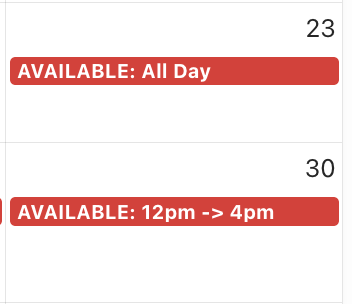
Official marks specific dates/times when they CAN officiate
Best for officials with limited or irregular availability
Why This Matters
Some officials have limited windows when they can work—perhaps they have demanding day jobs, are students, or have other commitments. The new Assume Unavailable method eliminates the need for these officials to block out large portions of their calendar. Instead, they can simply indicate the specific times they're available to officiate.
For Assignors: Display which method an Official is using
Availability Method Column
We've added an Availability Method column option to the assigning workspace (Officials side of the page) so you can instantly see which method each official is using:
✅ Checkmark Icon = Official uses Assume Available method
They're available unless they've added a blockout
🔒 Lock Icon = Official uses Assume Unavailable method
They're unavailable unless they've marked specific availability
How to Display This Column
Navigate to the Assigning Workspace
Click the Column icon on the Officials side of the page
Select Availability Method from the column options
The appropriate icon will display for each official
Important Considerations for Assignors
⚠️ Pay special attention to officials using the Lock (🔒) icon method - these officials have chosen to explicitly mark when they CAN work, meaning their availability may be more limited than those using the traditional method.
When assigning games:
Check the availability method to understand the official's scheduling approach
Officials with the Lock icon are ONLY available during their marked times
Officials with the Checkmark icon are available EXCEPT during blockouts
For Officials: New Method is Available
Officials have started using this new method to choose how to display their availability. A tutorial is available for them in the Officials portal and a step-by-step guide can be accessed in the Knowledge Base or through the AI-assisted chatbot.
Learn More
For detailed instructions on:
How officials can choose their availability method
How the methods display in the assigning workspace
Best practices for each method
View the tutorial here
Questions?
This feature is designed to make scheduling more efficient for both officials and assignors. If you have questions about implementing or using these availability methods, please contact support@refinsight.com.
Happy assigning!
The Ref Insight Team